seo-side-panel
SEO Side Panel, a free on-page SEO Chrome extension
SEO Side Panel stays open beside every page you visit and audits each one, using the page’s own code. No account, no API key, no server, no AI. Open a page, the panel reads it, and you get a list of what is wrong with a fix written next to each finding.
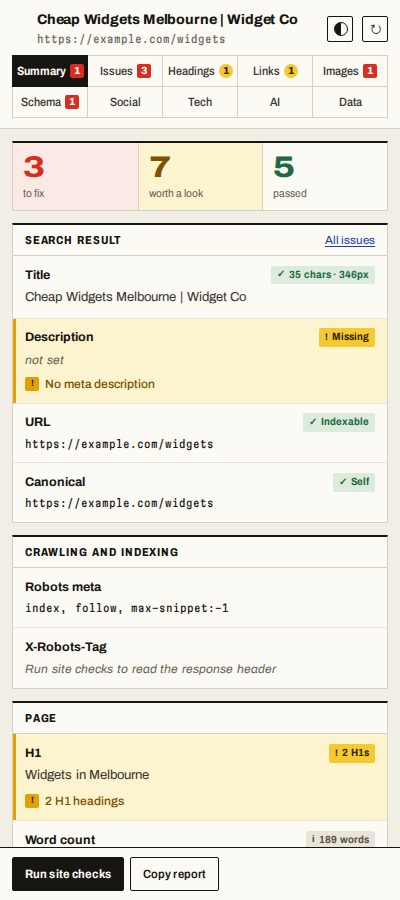
A Summary page puts the title, description, URL, canonical, robots directives, H1 and word count in one place, each with a coloured pill: red when it is broken, amber when it is worth a look, green when it is fine. Headings, Links, Images, Schema and Social each get their own page, with every row marked the same way.
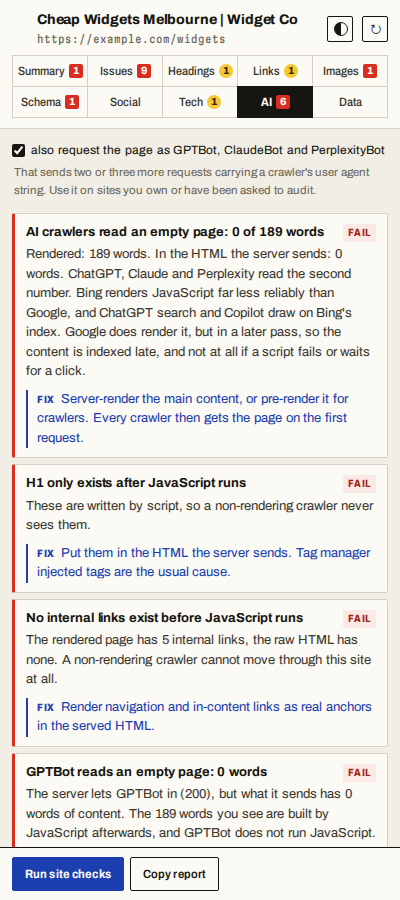
It answers two questions most SEO extensions skip. What does Google actually receive from this URL, and what do ChatGPT, Claude and Perplexity receive, which is usually not the same thing.


| Summary | AI crawlers | Links |
|---|---|---|
 |
 |
 |
Install
Coming to the Chrome Web Store. The link goes here once the listing is live. Chrome 114 or newer, because the side panel API landed in 114.
What it checks
On-page SEO. Title and meta description with real rendered pixel widths rather than character counts, canonical, meta robots, X-Robots-Tag, viewport, lang, charset, heading outline with skipped levels flagged, internal and external links, nofollow, images without alt text, Open Graph and Twitter cards, hreflang pairs.
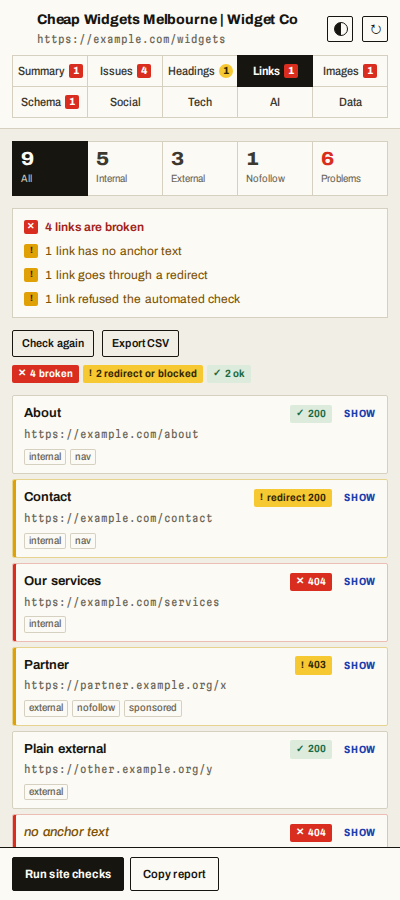
Links, with status. Every link with its anchor text, internal or external, nofollow, sponsored and ugc, links with no anchor text, and a Check status button that marks each one 200, redirect, 403 or 404. A 403 or 429 is shown in amber rather than called broken, because it is usually a site blocking scripts.
Images. Missing alt, empty alt, files far larger than they are shown (never an SVG, which has no pixels to waste), images that failed to load, lazy loading of an image somebody can actually see in the first screen (not the hidden frames of a carousel), and missing width and height only where nothing else holds the space: a CSS aspect-ratio or an image filling a sized box is left alone.
Word count, honestly. One number cannot describe a page built from tabs and sliders, so the panel says how many words are showing, how many sit in collapsed elements, and how many are a second copy of text already counted.
Structured data. Every JSON-LD block on the page, parsed, whatever shape it
comes in. A block with a trailing comma is ignored by Google in silence, so the
panel names the block, the line and the fault in words: a trailing comma, curly
quotes, single quotes, a missing comma, HTML entities. It also knows what Google
forgives. A // comment or a line break inside a text value fails a strict JSON
parser, yet Google and the Schema.org validator read the block anyway, so those are
an amber “not strict JSON” rather than a red failure. That line was measured
against the validator, not assumed.
Indexing. Whether this URL is listed in the site’s own XML sitemap, what robots.txt says about it per crawler, and whether a directive somewhere is quietly keeping the page out of the index.
AI search readiness. The extension fetches the raw HTML the server sends and compares it against the rendered DOM. GPTBot, ClaudeBot, PerplexityBot and CCBot do not run JavaScript, so anything that only exists after hydration is invisible to them. It also reads llms.txt, checks per-crawler robots.txt rules, and can repeat the request with a crawler’s user agent to catch a CDN or WAF turning those crawlers away.
Show it on the page. Every heading, link and image row has a Show button. It scrolls the page to that element and outlines it, which a popup cannot do because a popup closes the moment you click the page. The panel stays open beside it.
Copy and export. Copy any field on the Summary with one click, copy the heading
outline, copy the whole report, or export Links, Images and Headings as CSV. The
export follows the filter on screen, and cells are made safe for a spreadsheet, so
anchor text that starts with = cannot run as a formula.
Tech and tracking. 80 tracker signatures with their container and property IDs pulled out, CMS, theme, page builder, SEO plugin, JavaScript framework, site verification tags, social profiles, third party hosts, and a security header grade.
Why another SEO extension
| SEO Side Panel | Typical SEO toolbar | |
|---|---|---|
| Account or login | none | usually required |
| Sends the URL you visit to a server | never | usually |
| Metrics from a third party index | none | the main feature |
| Raw HTML vs rendered DOM diff | yes | rare |
| Per-crawler robots.txt rules | yes | rare |
| Crawler user agent probe | yes | rare |
| Every finding carries a fix | yes | sometimes |
| Price | free | freemium |
The trade is deliberate. You will not get Domain Rating or backlink counts here, because a browser cannot produce those without calling somebody else’s paid API. What you get is everything that can be read from the page itself, read properly.
Privacy
Reading the page happens locally and automatically. Nothing is transmitted. The only network requests are the ones you press a button for, and they go to the site you are looking at. The full policy is in PRIVACY.md.
Permissions, and why each one is there
| Permission | Why |
|---|---|
sidePanel |
the panel is the whole interface |
scripting |
runs the reader inside the tab to take a snapshot |
tabs |
knows which tab you are on and when you navigate |
storage |
remembers which tab of the panel you had open |
activeTab |
reads the tab you opened the panel on, with no standing access to anything |
declarativeNetRequestWithHostAccess |
sets a crawler user agent on the optional probe request |
<all_urls>, optional |
only if you allow it: reading other tabs as you move between them, fetching robots.txt, and checking links that point to other domains |
Installing grants access to no site at all, so Chrome shows no “read and change
your data on all websites” warning. The first page the panel cannot read puts up
a card with two buttons: allow this one site (the domain and its subdomains, so
the www and bare hosts both work), or allow every site. Either can be
taken back from chrome://extensions whenever you like.
Questions
Does it use AI? No. Every finding comes from a written rule. Nothing is sent to a language model and there is no API key to configure.
Does it slow pages down? It does not touch page load at all. The snapshot is taken after the page is ready. On a 5,400 node page the read takes well under a tenth of a second.
Why fetch raw HTML instead of reloading with JavaScript disabled? A JS-off reload loses form state, needs an extra permission, and still cannot show you a CDN blocking GPTBot specifically. Fetching the served HTML is exactly what a non-rendering crawler receives, and the same request can be repeated with a crawler user agent.
Why are title and meta measured in pixels? Google truncates on width, not character count. A 60 character title in wide letters gets cut, a 65 character one in narrow letters does not.
Does it work on localhost and staging sites? Yes. Nothing is phoned home, so a site behind a login or on a local port audits the same as a live one.
Will it tell me my rankings? No, and nothing that runs purely in a browser honestly can.
About this repository
This repository holds the privacy policy, the screenshots and this page. The extension’s source is not published here.
Built by Puneet Singh. Questions and feedback: send a message on LinkedIn.